AI Styling Studio — Infinite avatar looks from just 1 photo. Try it now.



Description
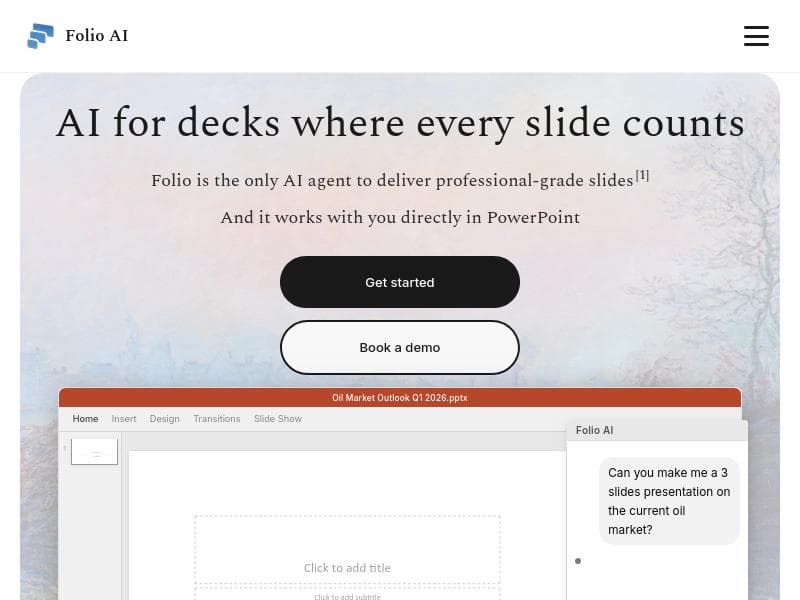
Folio AI uniquely integrates powerful AI capabilities directly within PowerPoint, enabling consultants and finance teams to create impactful, polished presentation decks faster and more efficiently. Its focus on making every slide count helps professionals deliver clear, data-driven narratives without leaving their familiar workflow.
Folio AI is an advanced AI-powered tool specifically designed to revolutionize the way professionals create presentation decks, ensuring that every slide delivers maximum impact. Its core purpose is to seamlessly integrate AI capabilities directly within Microsoft PowerPoint, empowering users to craft high-quality, compelling presentations with enhanced efficiency and precision. By embedding AI into the familiar PowerPoint environment, Folio AI eliminates the need to switch between multiple applications, streamlining the deck creation process and allowing users to focus on content and storytelling rather than formatting and design minutiae. One of the standout features of Folio AI is its deep integration with PowerPoint, which means users can access AI-driven assistance without leaving their workflow. This integration supports consultants and finance teams in particular, two groups that frequently rely on data-heavy, polished presentations to communicate complex information clearly and persuasively. Folio AI leverages artificial intelligence to automate and optimize various aspects of slide creation, such as generating slide content, suggesting layouts, refining text for clarity and impact, and ensuring consistency across the deck. This focus on making every slide count helps users produce presentations that are not only visually appealing but also strategically effective. Folio AI’s capabilities extend beyond basic automation. It enhances productivity by reducing the time spent on repetitive tasks like formatting and data visualization, allowing consultants and finance professionals to concentrate on analysis and narrative development. The tool’s AI can intelligently interpret data inputs and recommend the best ways to visualize them, which is crucial for finance teams that need to present complex financial metrics in an accessible manner. Additionally, Folio AI supports iterative improvement, enabling users to quickly refine and polish their decks based on AI feedback and suggestions. This tool is best suited for consultants, finance professionals, and anyone who regularly creates presentation decks where clarity, professionalism, and impact are paramount. Use cases include preparing client presentations, internal financial reports, strategic planning decks, and investor pitches. By automating routine tasks and enhancing slide quality, Folio AI helps these professionals save valuable time and elevate the overall effectiveness of their presentations. Regarding pricing, Folio AI offers a tiered plan structure to accommodate different user needs, though specific pricing details are available on their website. Typically, such plans include options for individual users, small teams, and enterprise-level deployments, with varying levels of access to features and support. Potential users are encouraged to visit the Folio AI website to explore current pricing and any available trials or demos. When compared to alternative presentation tools and AI assistants, Folio AI’s key differentiator is its native integration with PowerPoint, the industry-standard presentation software. Unlike standalone AI presentation generators or add-ons that require exporting and importing slides, Folio AI works directly within PowerPoint, preserving formatting and workflow continuity. This makes it especially appealing to professionals who rely heavily on PowerPoint and want to enhance their productivity without learning new software. However, users should consider that Folio AI’s specialization in consultants and finance teams means it may offer fewer features tailored to other industries or creative presentation styles. Notable limitations include the dependency on PowerPoint as the host application, which means users must have access to Microsoft Office. Additionally, while Folio AI excels in data-driven and professional presentations, it may not fully replace the need for human creativity and domain expertise in crafting narratives and strategic messaging. Users should view Folio AI as a powerful assistant that augments their skills rather than a complete substitute for manual presentation design and content creation. Overall, Folio AI stands out as a productivity-enhancing tool that brings AI directly into the heart of presentation creation for consultants and finance professionals, helping them deliver decks where every slide truly counts.
Tool Features
- AI integration directly within PowerPoint
- Designed for consultants and finance teams
- Enhances productivity in deck creation
- Focuses on making every slide count
Description
Folio AI uniquely integrates powerful AI capabilities directly within PowerPoint, enabling consultants and finance teams to create impactful, polished presentation decks faster and more efficiently. Its focus on making every slide count helps professionals deliver clear, data-driven narratives without leaving their familiar workflow.
Folio AI is an advanced AI-powered tool specifically designed to revolutionize the way professionals create presentation decks, ensuring that every slide delivers maximum impact. Its core purpose is to seamlessly integrate AI capabilities directly within Microsoft PowerPoint, empowering users to craft high-quality, compelling presentations with enhanced efficiency and precision. By embedding AI into the familiar PowerPoint environment, Folio AI eliminates the need to switch between multiple applications, streamlining the deck creation process and allowing users to focus on content and storytelling rather than formatting and design minutiae. One of the standout features of Folio AI is its deep integration with PowerPoint, which means users can access AI-driven assistance without leaving their workflow. This integration supports consultants and finance teams in particular, two groups that frequently rely on data-heavy, polished presentations to communicate complex information clearly and persuasively. Folio AI leverages artificial intelligence to automate and optimize various aspects of slide creation, such as generating slide content, suggesting layouts, refining text for clarity and impact, and ensuring consistency across the deck. This focus on making every slide count helps users produce presentations that are not only visually appealing but also strategically effective. Folio AI’s capabilities extend beyond basic automation. It enhances productivity by reducing the time spent on repetitive tasks like formatting and data visualization, allowing consultants and finance professionals to concentrate on analysis and narrative development. The tool’s AI can intelligently interpret data inputs and recommend the best ways to visualize them, which is crucial for finance teams that need to present complex financial metrics in an accessible manner. Additionally, Folio AI supports iterative improvement, enabling users to quickly refine and polish their decks based on AI feedback and suggestions. This tool is best suited for consultants, finance professionals, and anyone who regularly creates presentation decks where clarity, professionalism, and impact are paramount. Use cases include preparing client presentations, internal financial reports, strategic planning decks, and investor pitches. By automating routine tasks and enhancing slide quality, Folio AI helps these professionals save valuable time and elevate the overall effectiveness of their presentations. Regarding pricing, Folio AI offers a tiered plan structure to accommodate different user needs, though specific pricing details are available on their website. Typically, such plans include options for individual users, small teams, and enterprise-level deployments, with varying levels of access to features and support. Potential users are encouraged to visit the Folio AI website to explore current pricing and any available trials or demos. When compared to alternative presentation tools and AI assistants, Folio AI’s key differentiator is its native integration with PowerPoint, the industry-standard presentation software. Unlike standalone AI presentation generators or add-ons that require exporting and importing slides, Folio AI works directly within PowerPoint, preserving formatting and workflow continuity. This makes it especially appealing to professionals who rely heavily on PowerPoint and want to enhance their productivity without learning new software. However, users should consider that Folio AI’s specialization in consultants and finance teams means it may offer fewer features tailored to other industries or creative presentation styles. Notable limitations include the dependency on PowerPoint as the host application, which means users must have access to Microsoft Office. Additionally, while Folio AI excels in data-driven and professional presentations, it may not fully replace the need for human creativity and domain expertise in crafting narratives and strategic messaging. Users should view Folio AI as a powerful assistant that augments their skills rather than a complete substitute for manual presentation design and content creation. Overall, Folio AI stands out as a productivity-enhancing tool that brings AI directly into the heart of presentation creation for consultants and finance professionals, helping them deliver decks where every slide truly counts.
Frequently Asked Questions
What is Folio AI?
Folio AI is an AI-powered tool designed to enhance the creation of presentation decks by integrating directly within Microsoft PowerPoint. It helps users, especially consultants and finance teams, improve productivity and presentation quality by automating and optimizing slide content, layout, and design.
How much does Folio AI cost?
Folio AI offers tiered pricing plans tailored to different user needs, including individual and team options. For detailed pricing information and plan features, users should visit the official Folio AI website.
Who is Folio AI best for?
Folio AI is best suited for consultants, finance professionals, and anyone who frequently creates professional presentation decks where clarity, impact, and efficiency are critical.
What are the main features of Folio AI?
Key features include AI integration directly within PowerPoint, automation of slide content creation, intelligent layout and design suggestions, data visualization recommendations, and tools to enhance productivity and ensure every slide delivers maximum impact.
Does Folio AI offer a free trial?
Information about free trials or demos is available on the Folio AI website. Prospective users are encouraged to check there for the latest offers and trial availability.
What integrations does Folio AI support?
Folio AI integrates natively with Microsoft PowerPoint, allowing users to access AI-powered features directly within the PowerPoint application without needing additional software.
How does Folio AI work?
Folio AI works by embedding AI capabilities into PowerPoint, assisting users in creating and refining presentation slides. It automates routine tasks like formatting and content suggestions, helps visualize data effectively, and ensures consistency and clarity throughout the deck.
Sponsored Tools
















Reviews
No reviews yet. Be the first to share your experience.
Recommended Tools
Alternative Tools












Stay updated on latest Ai tools
Get the latest insights, Join our newsletter
Read and trusted by 50,000+ readers
Join the biggest AI Community
Our community and staff are here to help!
Your feedback will help Alice AI improve in future versions.







Submit your Tool

PoweredByAI.app is an AI Tools Directory helping individuals, businesses, and creators discover the best AI tools for writing, coding, design, productivity, and more.
© 2026 , Product of011BQ. All rights reserved.