Featured in:Best AI Writing Tools
Get featured →AI Styling Studio — Infinite avatar looks from just 1 photo. Try it now.

Description
✦
Feather is a privacy-focused photo editor optimized for Apple Silicon Macs, offering advanced AI-powered features like generative infill and magic selection—all processed offline. Ideal for photographers and creators who want powerful editing tools without subscriptions or cloud dependencies.
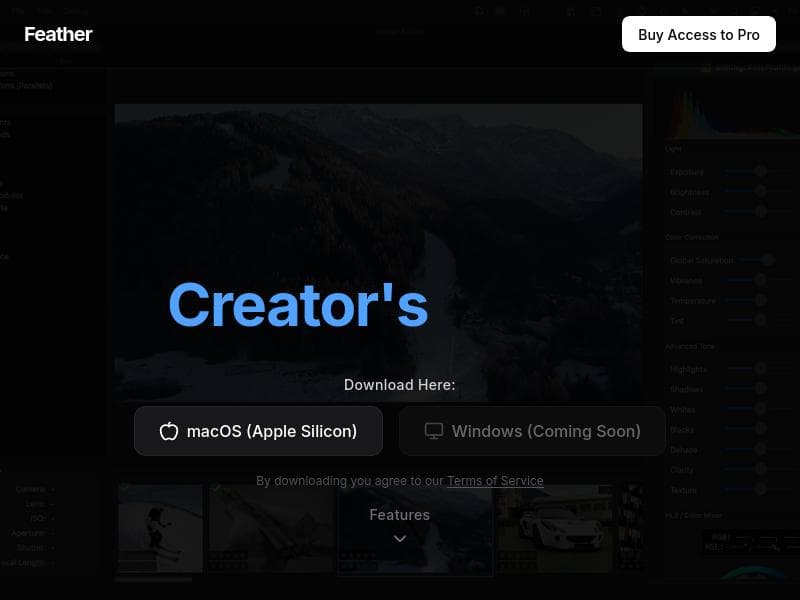
Feather is a powerful photo editing tool designed specifically for Apple Silicon Macs that prioritizes user privacy and offline processing. Unlike many cloud-based photo editors, Feather ensures that your photos never leave your device, offering peace of mind for users concerned about data security. Its core purpose is to provide advanced photo editing capabilities combined with AI-powered features such as generative infill, magic selection, and smart stacking, all processed locally. This approach leverages the high-performance capabilities of Apple Silicon to deliver fast, efficient, and high-quality image editing without the need for an internet connection. One of Feather's standout features is its AI generative infill, which intelligently fills in missing or unwanted parts of an image with contextually appropriate content. This allows users to seamlessly remove objects or repair photos with minimal manual effort. The AI magic selection tool simplifies the process of isolating subjects or specific areas within an image, making complex selections quick and intuitive. Smart stacking enhances the editing workflow by allowing users to combine multiple images or edits efficiently, improving creative possibilities and output quality. The user interface is modern, clean, and designed with creators in mind, ensuring that both beginners and experienced photographers can navigate and utilize the tool effectively. Additionally, Feather is optimized for mobile use, making it a versatile option for photographers who want to edit on the go without sacrificing power or quality. Feather is ideal for photographers, digital artists, and content creators who value privacy and high-quality image editing. Mobile photographers who use Apple Silicon Macs will find Feather particularly useful due to its optimization for seamless mobile workflows. The tool is well-suited for those who require advanced editing features but prefer a one-time purchase model rather than subscription-based pricing. Specific use cases include professional photo retouching, creative image manipulation, and quick edits for social media content. Its offline capabilities also make it a great choice for users working in environments with limited or no internet access. Regarding pricing, Feather follows a pay-once-to-use-forever model, which is appealing for users who dislike recurring subscription fees. While the exact price is not detailed here, this model typically offers long-term value and cost savings compared to subscription alternatives. This pricing approach aligns well with users who want a reliable, full-featured photo editor without ongoing costs. Compared to other photo editing tools, Feather stands out due to its offline AI processing on Apple Silicon Macs, ensuring privacy and speed. Many competitors rely on cloud-based AI services, which can introduce latency and privacy concerns. Feather’s focus on a modern, intuitive UI and mobile optimization also differentiates it from more traditional desktop editors that may not be as user-friendly or mobile-compatible. However, Feather’s exclusivity to Apple Silicon Macs means it is not available to users on other platforms, which could be a limitation for those using Windows or older Mac hardware. Potential limitations include the lack of cross-platform availability and the absence of a free trial, which might make it harder for some users to evaluate the software before purchase. Additionally, while Feather offers advanced AI features, users requiring extensive professional-grade editing tools or integrations with other software ecosystems might find it less comprehensive than some industry-standard editors. Nonetheless, for its target audience, Feather offers a compelling blend of privacy, AI-powered editing, and ease of use. In summary, Feather is a niche but powerful photo editing tool that combines advanced AI capabilities with a privacy-first approach, optimized for Apple Silicon Macs. Its pay-once pricing, offline processing, and intuitive design make it an excellent choice for photographers and creators seeking a secure, efficient, and creative photo editing experience.
Tool Features
- Advanced photography tools for mobile devices
- User-friendly interface designed for creators
- Enhances photo capturing and editing experience
- Optimized for seamless mobile use
- Focus on creativity and high-quality image output
Description
✦
Feather is a privacy-focused photo editor optimized for Apple Silicon Macs, offering advanced AI-powered features like generative infill and magic selection—all processed offline. Ideal for photographers and creators who want powerful editing tools without subscriptions or cloud dependencies.
Feather is a powerful photo editing tool designed specifically for Apple Silicon Macs that prioritizes user privacy and offline processing. Unlike many cloud-based photo editors, Feather ensures that your photos never leave your device, offering peace of mind for users concerned about data security. Its core purpose is to provide advanced photo editing capabilities combined with AI-powered features such as generative infill, magic selection, and smart stacking, all processed locally. This approach leverages the high-performance capabilities of Apple Silicon to deliver fast, efficient, and high-quality image editing without the need for an internet connection. One of Feather's standout features is its AI generative infill, which intelligently fills in missing or unwanted parts of an image with contextually appropriate content. This allows users to seamlessly remove objects or repair photos with minimal manual effort. The AI magic selection tool simplifies the process of isolating subjects or specific areas within an image, making complex selections quick and intuitive. Smart stacking enhances the editing workflow by allowing users to combine multiple images or edits efficiently, improving creative possibilities and output quality. The user interface is modern, clean, and designed with creators in mind, ensuring that both beginners and experienced photographers can navigate and utilize the tool effectively. Additionally, Feather is optimized for mobile use, making it a versatile option for photographers who want to edit on the go without sacrificing power or quality. Feather is ideal for photographers, digital artists, and content creators who value privacy and high-quality image editing. Mobile photographers who use Apple Silicon Macs will find Feather particularly useful due to its optimization for seamless mobile workflows. The tool is well-suited for those who require advanced editing features but prefer a one-time purchase model rather than subscription-based pricing. Specific use cases include professional photo retouching, creative image manipulation, and quick edits for social media content. Its offline capabilities also make it a great choice for users working in environments with limited or no internet access. Regarding pricing, Feather follows a pay-once-to-use-forever model, which is appealing for users who dislike recurring subscription fees. While the exact price is not detailed here, this model typically offers long-term value and cost savings compared to subscription alternatives. This pricing approach aligns well with users who want a reliable, full-featured photo editor without ongoing costs. Compared to other photo editing tools, Feather stands out due to its offline AI processing on Apple Silicon Macs, ensuring privacy and speed. Many competitors rely on cloud-based AI services, which can introduce latency and privacy concerns. Feather’s focus on a modern, intuitive UI and mobile optimization also differentiates it from more traditional desktop editors that may not be as user-friendly or mobile-compatible. However, Feather’s exclusivity to Apple Silicon Macs means it is not available to users on other platforms, which could be a limitation for those using Windows or older Mac hardware. Potential limitations include the lack of cross-platform availability and the absence of a free trial, which might make it harder for some users to evaluate the software before purchase. Additionally, while Feather offers advanced AI features, users requiring extensive professional-grade editing tools or integrations with other software ecosystems might find it less comprehensive than some industry-standard editors. Nonetheless, for its target audience, Feather offers a compelling blend of privacy, AI-powered editing, and ease of use. In summary, Feather is a niche but powerful photo editing tool that combines advanced AI capabilities with a privacy-first approach, optimized for Apple Silicon Macs. Its pay-once pricing, offline processing, and intuitive design make it an excellent choice for photographers and creators seeking a secure, efficient, and creative photo editing experience.
Frequently Asked Questions
What is Feather?
Feather is a photo editing application designed for Apple Silicon Macs that uses AI-powered tools such as generative infill, magic selection, and smart stacking, all processed offline to ensure privacy and high performance.
How much does Feather cost?
Feather uses a pay-once-to-use-forever pricing model, meaning you pay a single fee for lifetime access. Specific pricing details can be found on their official website.
Who is Feather best for?
Feather is best suited for photographers, digital artists, and content creators who use Apple Silicon Macs and want advanced photo editing features with a focus on privacy and offline processing.
What are the main features of Feather?
Key features include AI generative infill for seamless image repair, AI magic selection for easy subject isolation, smart stacking for combining edits, a modern and intuitive user interface, and full offline processing optimized for Apple Silicon Macs.
Does Feather offer a free trial?
Currently, Feather does not offer a free trial. Users can learn more about the tool and its capabilities through the official website before purchasing.
What integrations does Feather support?
Feather primarily functions as a standalone photo editing tool optimized for Apple Silicon Macs. There is no specific information about integrations with other software or platforms.
How does Feather work?
Feather processes all photo edits locally on your Apple Silicon Mac using AI-powered tools to enhance and manipulate images. This offline approach ensures that your photos remain private and editing is fast and efficient.
Sponsored Tools
















Reviews
0 reviews
No reviews yet. Be the first to share your experience.
Recommended Tools
RecoveritWondershare FilmoraTalorDataSweetTalk AIPlanCheckerProAnswerThisBanana AI AgentLocalRAG!kikivoice.aiJS2TS
Alternative Tools












Stay updated on latest Ai tools
Get the latest insights, Join our newsletter
Read and trusted by 50,000+ readers
Join the biggest AI Community
Our community and staff are here to help!
Your feedback will help Alice AI improve in future versions.







Submit your Tool

PoweredByAI.app is an AI Tools Directory helping individuals, businesses, and creators discover the best AI tools for writing, coding, design, productivity, and more.
© 2026 , Product of011BQ. All rights reserved.