AI Styling Studio — Infinite avatar looks from just 1 photo. Try it now.

Description
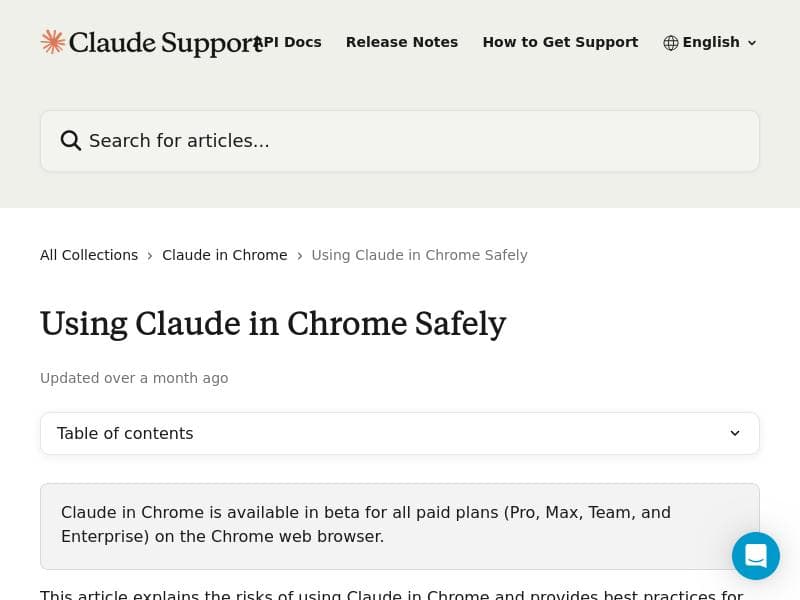
Claude in Chrome uniquely empowers users by enabling AI-driven navigation, form filling, and debugging directly within the Chrome browser. Ideal for developers and professionals who want to automate web tasks and streamline workflows, it integrates seamlessly with Claude Code and Desktop for a comprehensive AI-assisted experience.
Claude in Chrome is an innovative AI assistant designed to seamlessly integrate with the Chrome browser, elevating user productivity by enabling the AI to interact directly with web pages. Unlike traditional AI chatbots that only provide text-based responses, Claude in Chrome can navigate websites, click buttons, and fill out forms autonomously, making it a powerful tool for automating routine web tasks. This capability is especially enhanced through its compatibility with Claude Code and Claude Desktop, allowing users to build code in their terminal, verify results in the browser, and debug efficiently with Claude analyzing console errors and the Document Object Model (DOM) state in real-time. Initially launched in beta for paid subscribers after extensive real-world testing, Claude in Chrome is now available to all paid plans, reflecting its maturity and reliability. Key features of Claude in Chrome include a deep integration of the Claude AI assistant directly into the Chrome browser environment, which allows for contextual understanding and interaction with web elements. The tool emphasizes safe usage guidelines to ensure privacy and security when the AI interacts with sensitive browser data. It supports multiple languages, catering to a global user base, and comes with preloaded fonts that enhance the user interface experience, making interactions visually clear and accessible. The integration with Claude Code is particularly notable, as it bridges the gap between development and testing by enabling developers to build in their terminal and immediately validate and debug in the browser with AI assistance. This reduces the feedback loop and accelerates development workflows. Claude in Chrome is ideal for professionals who frequently interact with web applications, including developers, QA engineers, digital marketers, and customer support teams. Developers benefit from the debugging and code verification features, while marketers and support teams can automate form filling and navigation tasks, saving time and reducing errors. The AI’s multilingual support also makes it suitable for international teams and users who work across different languages and regions. Use cases range from automated testing and debugging of web applications to streamlining data entry tasks and enhancing web-based research by automating repetitive interactions. Regarding pricing, Claude in Chrome operates on a freemium model. While the browser integration is available in beta to all paid subscribers, the expansion to all paid plans means users must subscribe to a paid tier to access the full capabilities. This approach ensures that users receive a robust, secure, and continuously improved experience backed by dedicated support. The freemium aspect may include limited access or trial features, but full functionality is reserved for paid subscribers, aligning with enterprise and professional usage scenarios. Compared to alternatives, Claude in Chrome stands out due to its direct browser integration and ability to interact with web page elements beyond simple text input and output. While many AI assistants provide conversational capabilities, few offer the level of interaction with the browser DOM and console errors that Claude does. Its integration with Claude Code also differentiates it by providing a unified environment for coding, testing, and debugging, which is not commonly found in other AI tools. However, users should consider that the tool is currently available only for Chrome, which may limit accessibility for users on other browsers. Additionally, as a beta feature for paid subscribers, new users may experience some evolving functionality as the product matures. In summary, Claude in Chrome is a cutting-edge AI assistant that transforms how users interact with the web by automating navigation, form filling, and debugging tasks directly within the browser. Its rich feature set, including multilingual support and integration with development tools, makes it a versatile solution for professionals seeking to enhance productivity and streamline workflows. While it requires a paid subscription for full access, its unique capabilities position it as a valuable asset for developers, marketers, and support teams looking to leverage AI in their daily browser activities.
Tool Features
- Integration of Claude AI assistant into Chrome browser
- Safe usage guidelines for AI in browser
- Enhanced productivity with AI-powered assistance
- Supports multiple languages for global users
- Preloaded fonts for better UI experience
Description
Claude in Chrome uniquely empowers users by enabling AI-driven navigation, form filling, and debugging directly within the Chrome browser. Ideal for developers and professionals who want to automate web tasks and streamline workflows, it integrates seamlessly with Claude Code and Desktop for a comprehensive AI-assisted experience.
Claude in Chrome is an innovative AI assistant designed to seamlessly integrate with the Chrome browser, elevating user productivity by enabling the AI to interact directly with web pages. Unlike traditional AI chatbots that only provide text-based responses, Claude in Chrome can navigate websites, click buttons, and fill out forms autonomously, making it a powerful tool for automating routine web tasks. This capability is especially enhanced through its compatibility with Claude Code and Claude Desktop, allowing users to build code in their terminal, verify results in the browser, and debug efficiently with Claude analyzing console errors and the Document Object Model (DOM) state in real-time. Initially launched in beta for paid subscribers after extensive real-world testing, Claude in Chrome is now available to all paid plans, reflecting its maturity and reliability. Key features of Claude in Chrome include a deep integration of the Claude AI assistant directly into the Chrome browser environment, which allows for contextual understanding and interaction with web elements. The tool emphasizes safe usage guidelines to ensure privacy and security when the AI interacts with sensitive browser data. It supports multiple languages, catering to a global user base, and comes with preloaded fonts that enhance the user interface experience, making interactions visually clear and accessible. The integration with Claude Code is particularly notable, as it bridges the gap between development and testing by enabling developers to build in their terminal and immediately validate and debug in the browser with AI assistance. This reduces the feedback loop and accelerates development workflows. Claude in Chrome is ideal for professionals who frequently interact with web applications, including developers, QA engineers, digital marketers, and customer support teams. Developers benefit from the debugging and code verification features, while marketers and support teams can automate form filling and navigation tasks, saving time and reducing errors. The AI’s multilingual support also makes it suitable for international teams and users who work across different languages and regions. Use cases range from automated testing and debugging of web applications to streamlining data entry tasks and enhancing web-based research by automating repetitive interactions. Regarding pricing, Claude in Chrome operates on a freemium model. While the browser integration is available in beta to all paid subscribers, the expansion to all paid plans means users must subscribe to a paid tier to access the full capabilities. This approach ensures that users receive a robust, secure, and continuously improved experience backed by dedicated support. The freemium aspect may include limited access or trial features, but full functionality is reserved for paid subscribers, aligning with enterprise and professional usage scenarios. Compared to alternatives, Claude in Chrome stands out due to its direct browser integration and ability to interact with web page elements beyond simple text input and output. While many AI assistants provide conversational capabilities, few offer the level of interaction with the browser DOM and console errors that Claude does. Its integration with Claude Code also differentiates it by providing a unified environment for coding, testing, and debugging, which is not commonly found in other AI tools. However, users should consider that the tool is currently available only for Chrome, which may limit accessibility for users on other browsers. Additionally, as a beta feature for paid subscribers, new users may experience some evolving functionality as the product matures. In summary, Claude in Chrome is a cutting-edge AI assistant that transforms how users interact with the web by automating navigation, form filling, and debugging tasks directly within the browser. Its rich feature set, including multilingual support and integration with development tools, makes it a versatile solution for professionals seeking to enhance productivity and streamline workflows. While it requires a paid subscription for full access, its unique capabilities position it as a valuable asset for developers, marketers, and support teams looking to leverage AI in their daily browser activities.
Frequently Asked Questions
What is Claude in Chrome?
Claude in Chrome is an AI assistant integrated directly into the Chrome browser that can navigate websites, click buttons, fill forms, and assist with debugging by reading console errors and DOM state. It works alongside Claude Code and Claude Desktop to enhance productivity and streamline web-based workflows.
How much does Claude in Chrome cost?
Claude in Chrome is available under a freemium pricing model. While some features may be accessible for free or in beta, full access to Claude in Chrome requires a paid subscription to one of Claude's plans.
Who is Claude in Chrome best for?
Claude in Chrome is best suited for developers, QA engineers, digital marketers, customer support teams, and any professionals who frequently interact with web applications and want to automate tasks such as form filling, navigation, and debugging.
What are the main features of Claude in Chrome?
Key features include AI-powered navigation and interaction within the Chrome browser, safe usage guidelines to protect user data, multilingual support, preloaded fonts for an enhanced UI experience, and integration with Claude Code for building, verifying, and debugging code seamlessly.
Does Claude in Chrome offer a free trial?
Claude in Chrome is available in beta to all paid subscribers, and it operates on a freemium model. While there may be limited free access or trial features, full functionality is unlocked through a paid subscription.
What integrations does Claude in Chrome support?
Claude in Chrome integrates closely with Claude Code and Claude Desktop, allowing users to build code in their terminal, verify it in the browser, and debug with AI assistance by analyzing console errors and DOM state.
How does Claude in Chrome work?
Claude in Chrome works by embedding the Claude AI assistant into the Chrome browser, enabling it to understand and interact with web page elements. It can automate navigation, click buttons, fill out forms, and assist with debugging by reading console logs and the DOM, thereby streamlining web-based tasks.
Socials
Use ToolSponsored Tools
















Reviews
No reviews yet. Be the first to share your experience.
Recommended Tools
Alternative Tools









Stay updated on latest Ai tools
Get the latest insights, Join our newsletter
Read and trusted by 50,000+ readers
Join the biggest AI Community
Our community and staff are here to help!
Your feedback will help Alice AI improve in future versions.







Submit your Tool

PoweredByAI.app is an AI Tools Directory helping individuals, businesses, and creators discover the best AI tools for writing, coding, design, productivity, and more.
© 2026 , Product of011BQ. All rights reserved.